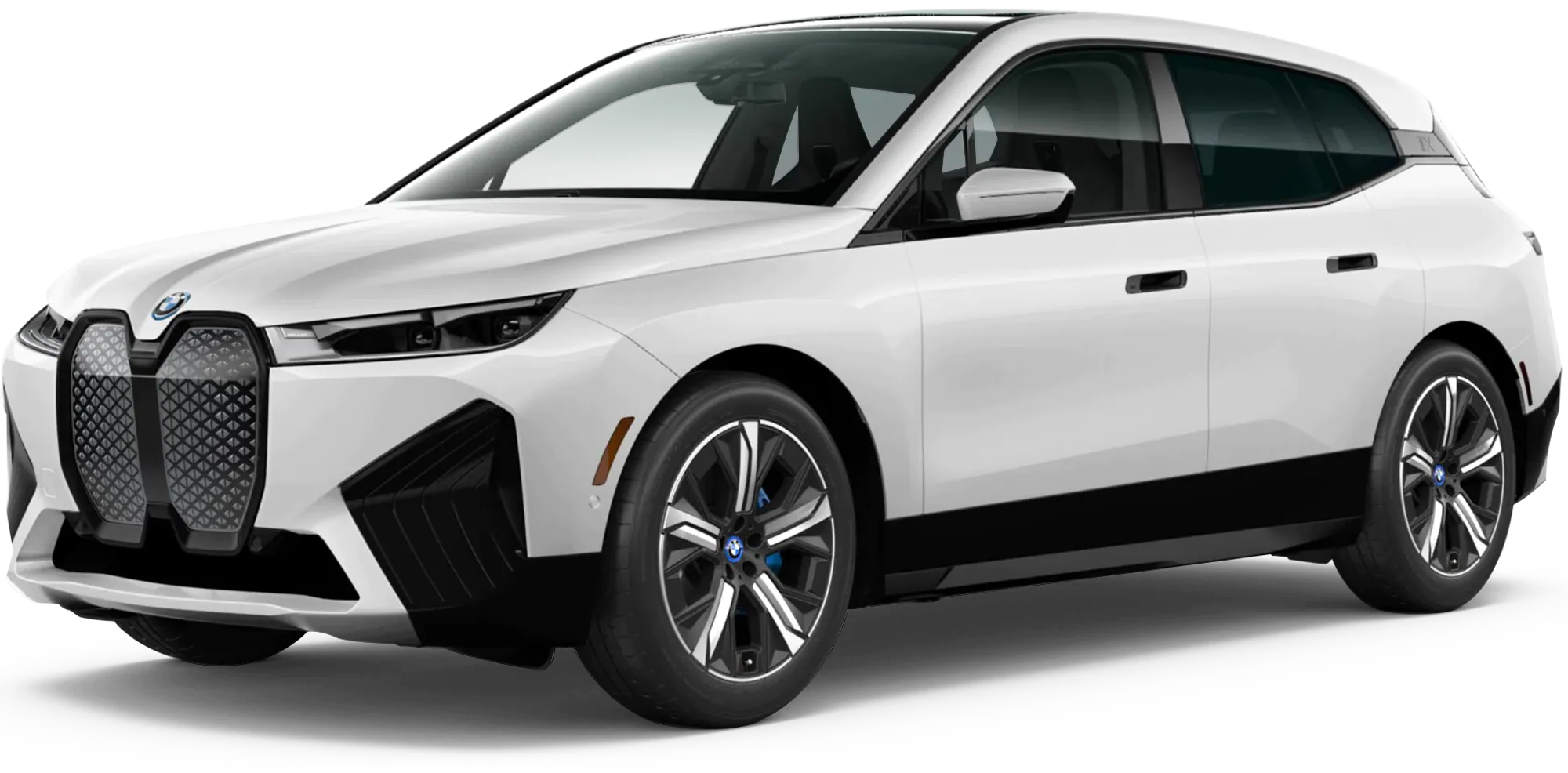
April 13, 2022 NHTSA CAMPAIGN NUMBER: 22V240000
Airbag Control Unit Software Malfunction
An air bag malfunction indicator light that fails to warn the driver of a problem increases the risk of injury in a crash.
NHTSA Campaign Number: 22V240
Manufacturer BMW of North America, LLC
Components AIR BAGS
Potential Number of Units Affected 1,029
Summary
BMW of North America, LLC (BMW) is recalling certain 2022-2023 iX xDrive40, iX XDrive50, and iX M60 vehicles. The air bag malfunction indicator light and display message may not illuminate in the event of a problem with the air bag control or pedestrian protection systems, due to incorrect software.
Remedy
Dealers will reprogram the air bag control unit software, free of charge. Owner notification letters were mailed June 13, 2022. Owners may contact BMW customer service at 1-800-525-7417.
Notes
Owners may also contact the National Highway Traffic Safety Administration Vehicle Safety Hotline at 1-888-327-4236 (TTY 1-800-424-9153), or go to www.nhtsa.gov.
Check if your BMW has a Recall
SIB 65 06 22
2022-07-25
RECALL 22V-240: AIR BAG CONTROL UNIT
This Service Information Bulletin (Revision 1) replaces SI B65 06 22 dated July 2022.
What’s New (Specific text highlighted):
- Cause, Correction, Procedure, Claim information added
MODEL
| E-Series | Model Description | Production Date |
| I20 | iX Sports Activity Vehicle | October 14, 2021 – July 1, 2022 |
AFFECTED VEHICLES
Vehicles which require this Recall Campaign to be completed will show it as “Open” when checked either in AIR, the “Service Menu” of DCSnet (Dealer Communication System), ISPA Next or Warranty Vehicle Inquiry.
SITUATION
BMW AG is conducting a Voluntary Safety Recall (effective July 5, 2022) on certain Model Year 2022 – 2023 BMW iX SAV vehicles that were produced between October 14, 2021 and July 1, 2022.
In April, BMW Group decided to conduct a voluntary safety recall but due to an issue with the current remedy (software update), those vehicles will need to return to a BMW center to receive a further update.
In addition, this action expands the potentially affected vehicle population.
During supplier production, air bag control unit software may not have been programmed to specifications. As a result, the air bag warning lamp in the instrument cluster may not be illuminated when necessary. Note, air bag deployment in a crash is *not* affected.
The Recall Notice and Q&A have been attached for further information.
CAUSE
Software error in the air bag control unit (ACSM6).
CORRECTION
Program the vehicle.
PROCEDURE
- Determine the vehicle’s current I-level by either using AIR or the ISPA NEXT application. If needed, usethe latest ISTA to work through test modules.
- Is the current vehicle integration level:
YES: Proceed to Step 3
NO: No further action necessary
- Program the vehicle using ISTA 4.36.3 or higher (estimated release July 28, 2022, pending verification).
- Did the vehicle program correctly the first time?
YES: No further action necessary
NO: Program the vehicle a 2nd time and claim WP #2 or #5.
Note that ISTA will automatically reprogram and code all programmable control modules that do not have the latest software.
Depending on the rework list, carry out a vehicle test and delete the fault memory, if required.
Always connect a BMW-approved battery charger/power supply (SI B04 23 10).
The following are known issues that might occur during programming:
- Fault code “7E0503 UCAP, secure Ethernet communication: No connection established with MPAD”cannot be deleted.
The fault can be deleted after a vehicle sleep cycle
- When programming vehicles with ADCAM low (without SA 5AU) the Automatic control unit validationmight fail.
Follow the attached procedure “ADCAM Low Validation Procedure”.
Note: INFO123825 will show open on your VIN if it has ADCAM Low. It may still show open up to a week after you’ve done the procedure.
- Automatic Secure Token (LCS) – Download not possible or failed message appears.
Go to “Vehicle modifications” > “immediate measures” > select: “Activate customer functions”. This retries the Activation (SFA) Tokens and synchronizes them.
If this does not work, follow the instructions to download and request the token manually and send them to Technical Support for a response token generation.
For information on programming and coding with ISTA, refer to DealerSpeed / TIS / Technical Documentation / Diagnostics and Programming / Programming Documentation.
PARTS INFORMATION
Parts replacement will not provide a solution.
ISTA: Important notes concerning version 4.36.3x
Please note the following concerning ISTA version 4.36.3x for programming models I20
When programming I20 vehicles with ADCAM low (without SA 5AU) to 22-07 the control unit validation might fail. The technician will see the following error message in ISTA:
2. After pressing “Next” ISTA will automatically generate a Validation request file “ValidationRequest_VIN_xxx.json.zip” and opens a dialogue to save this file.
3. Please save the file and continue with measure plan execution.
4. Before sending the file please check if ADCAM low is the root cause of the problem:
If the DTC 0x025D80 – ADCAML: Certificates (type 1) not ready is active in the vehicle please continue with step 3 and do not raise a TSARA ticket.
If this DTC is not in the vehicle please raise a normal TSARA ticket.
5. The request file must be sent to the following E-Mail: [email protected]
Please send the file as it is, do not zip it again, unzip it or rename it. Please send only one request file per E-Mail. Example:
6. First you will receive an auto response mail that your request was successfully sent. If the process in the backend is finished you will receive a second response to your E-Mail address Note: if the process works as planned, the response should be received within 30 minutes. Response example:
7. After the positive response you can start a new ISTA session. Please perform an overall coding of the vehicle. This should now work without issues. After this step the Adcam low issue ist fixed.
Problem handling:
1. No receipt of auto response E-Mail => Check your E-Mail (mail box full, firewall) and fix E-Mail problem or resend from different mail account
2. No receipt of “Success E-Mail”: The answer should be received within 30 min, in case of delay please wait 2h before contacting technical support
3. Negative response E-Mail:
- Check if mail was sent correct; (only one request file per E-Mail; file was sent as saved by ISTA no zip/unzip operation or renaming was performed)
- Resend E-Mail from different mail account
In case this does still not work please contact technical support
4. Positive response e-mail, but overall coding does not work => contact technical support
Safety Recall
22V-240
Air Bag Control Unit
Model Year 2022-2023 BMW iX
Issue Date: 04/07/2022
Update Date: 07/05/2022
Q1. Which BMW Group models in the US are potentially affected by this Safety Recall?
Model Year 2022-2023 BMW iX models in the US are potentially affected.
Q2. What is the specific issue?
During supplier production, air bag control unit software may not have been programmed to specifications. As a result, the air bag warning lamp in the instrument cluster may not be illuminated when necessary. Note, air bag deployment in a crash is *not* affected.
Q3. Did BMW conduct a similar Safety Recall earlier this year?
Yes. A similar Safety Recall was conducted earlier this year.
Q4. If I had a similar Safety Recall performed earlier, will I need to have this Safety Recall performed again?
Yes. Your vehicle will need to have this Safety Recall performed.
Q5. Why do I have to have this Safety Recall performed again?
Unfortunately, the earlier remedy (software update) may not have been completely effective.
Q6. Why are other models / vehicles not included in this Safety Recall?
Other models have different air bag control units with software programmed to specifications.
Q7. Can I continue to drive my vehicle?
Yes. However, when you are notified by BMW of this Safety Recall, please contact an authorized BMW center to schedule an appointment as soon as possible. For the latest updates to this Safety Recall, please visit bmwusa.com/recall. If you are not the only driver of this vehicle, please advise all other drivers of this important information.
Q8. How did BMW Group become aware of the issue?
BMW Group became aware of the issue through its quality control procedures.
Q9. How will I be informed of this Safety Recall?
Owners of potentially affected vehicles will be notified via First Class mail and requested to schedule an appointment with an authorized BMW center to have the remedy performed. Owners can locate their nearest authorized BMW center at bmwusa.com/dealer.
To ensure BMW has your recent contact and vehicle information, owners should visit bmwusa.com/recall and click on “Manage recall notices and contact information”.
How will my vehicle be remedied?
The air bag control unit will be reprogrammed for free and will take approximately one hour.
Q10. Do I have to wait for BMW to contact me to have the remedy performed?
Yes. We are in the process of implementing this Safety Recall to ensure that the necessary parts, tools, and procedures are available. For the latest updates to this recall, please visit bmwusa.com/recall.
2 Affected Products
Vehicle
| MAKE | MODEL | YEAR |
| BMW | IX | 2022-2023 |
12 Associated Documents
Defect Notice 573 Report
RCLRPT-22V240-3996.PDF 214.387KB
Remedy Instructions and TSB
RCRIT-22V240-9297.pdf 229.509KB
Manufacturer Notices(to Dealers,etc) – BMW Delivery Stop: Air Bag Control Unit
RCMN-22V240-9345.pdf 149.026KB
Remedy Instructions and TSB
RCRIT-22V240-2961.pdf 222.538KB
Recall Acknowledgement
RCAK-22V240-5294.pdf 645.226KB
ISSUED Owner Notification Letter(Part 577)
RCONL-22V240-9493.pdf 1605.357KB
Manufacturer Notices(to Dealers,etc) – NEW VEHICLE DEMONSTRATION / DELIVERY HOLD Safety Recall 22S26 Supplement # 2 Certain 2020-2021 MY Expedition, 2020-2021 F-150, 2020-2021 Navigator, 2020-2022 Super Duty Vehicles Both Front Wiper Arm Replacement
Remedy Instructions and TSB
RCRIT-22V240-3489.pdf 450.157KB
Recall Quarterly Report #1, 2022-2
RCLQRT-22V240-7003.PDF 211.136KB
Miscellaneous Document – Copy of ONL re Air Bag Control Unit Software
RMISC-22V240-7782.pdf 3202.244KB
Recall Quarterly Report #2, 2022-3
RCLQRT-22V240-7661.PDF 211.238KB
Recall Quarterly Report #3, 2022-4
RCLQRT-22V240-6028.PDF 211.321KB
Latest Recalls Documents

- [Easy to Use—Work Out of the Box] + [FOXWELL 2026 New Version] FOXWELL NT604 Elite scan tool is the 2026 new version from FOXWELL, designed for car owners who want to figure out the cause of issues before fixing car problems by scanning common systems like ABS, SRS, engine, and transmission. The NT604 Elite obd2 scanner diagnostic tool comes with the latest software—no need to waste time downloading software first. Plug the scanner into the OBDII port with OBDII cable to start the diagnosis.
- [Affordable] + [Reliable Car Health Monitor] Will you be confused what happens when the warning light of ABS/SRS/transmission/check engine flashes? Instead of taking your cars to dealership, this FOXWELL scanner will help you do a thorough scanning and detection for your cars and pinpoint the root cause. Note:The device is a diagnostic tool, not a repair tool. To turn off a warning light, you must first physically repair the issue causing it. Only then can the scanner be used to clear the corresponding fault code.
- [5 in 1 Car Diagnostic Scanner] Compared with obd scanners (50-100), NT604 Elite code scanner not only includes their OBDII diagnosis but also serves as ABS/SRS scanner, transmission and check engine code reader. When it’s an odb2 scanner, you can use it to check if your car is ready for annual test through I/M readiness menu. In addition, live data stream, built-in DTC library, data play back and print, all these features are a big plus for it. Note: doesn't support maintenance functions like reset or relearn. For the SRS system, NT604 Elite can read and clear common fault codes not caused by a crash, but crash/collision data cannot be cleared.
- [Fantastic AUTOVIN] + [No extra software fee] Through the AUTOVIN menu, this NT604 Elite car scanner allows you to get your V-IN and vehicle info rapidly, no need to take time to find your V-IN and input one by one. What's more, the NT604 Elite ABS SRS scanner supports 60+ car brands from worldwide (America/Asia/Europe). You don’t need to pay extra software fee. AUTOVIN may not work on some older vehicles or certain vehicle brands. If AUTOVIN fails, please input the vin code manually or go to the Diagnostic Menu to select your vehicle model.
- [Solid protective case KO plastic carrying bag] + [Lifetime update] Almost all same price-level car scanner diagnostic tool only offers plastic bag to hold the scanner.However, NT604 Elite automotive scanner is equipped with solid protective case, preventing your obd2 scanner from damage. Then you don’t need to pay extra money to buy a solid toolbox.


- 【Reset ABS/SRS/Transmission/Engine Lights】 More than an check engine code reader, OBDMATE OM901 obd2 scanner performs comprehensive diagnostics for the 4 most-used systems (ABS/SRS/Engine/Transmission). It quickly clears fault codes, turns off warning lights, read data stream and auto VIN.
- 【3.5" Handheld Scanner with 4 System Diagnose】 3.5" Super large TFT screen equipped displays an intuitive menu and clear readings of various sensors from ABS, SRS, ECM and TCM systems. It arrived with a silicone protective case and hard-shell carrying case, ensuring long-lived durability and drop resistance. The car diagnostic tool is plug-to-play designed, plug it and get diagnosis started without any batteries or updates required.
- 【One-Click I/M Readines&Full OBD2 Functions】 Press F1 to get an intuitive corloured form about whether various emissions-related systems on the vehicle are operating properly. Help you get smog-check ready quickly. OM901 car scanner supports all essential OBD2 functions you need: read & clear codes, view freeze frame, read I/M readiness, retrieve VIN, live data stream (with graphing display), O2 sensor test, onboard monitoring mode, and EVAP leak test.
- 【Battery Voltage Check&DLC Pin Test】 It allows you to monitor battery health by testing current battery voltage. Plus, this obd2 diagnostic tool features DLC 16-PIN test to check current voltage of every pin.
- 【Automotive Scanner Diagnostic Kit】 The package comes with 1 car scanner, 1 USB-type c cable, 1 hard storage bag and 1 user manual(en). Free to update without any hidden fees. 5 languanges available in setting including English, French, Italian, German and Espanish. Valuable and Portable, making it a great tool kit for car owners, DIY enthusiasts, and professional mechanics.
- OBD2 SCANNER FOR ALL SYSTEMS – The INNOVA SD35 is a tablet-based OBD2 scanner designed for advanced diagnostics. Read and clear check engine light, ABS, SRS, and TPMS codes, plus test your car battery and alternator to prevent unexpected failures. Vehicle coverage may vary. Please use Innova’s Coverage Checker to verify compatibility.
- ALL-SYSTEM DIAGNOSTICS & LIVE DATA – Unlike basic code readers, this OBD2 scanner for all vehicles scans engine, transmission, ABS, SRS, and more. Get real-time live data, including RPM, fuel trims, temperature readings, and oxygen sensor performance.
- OBD2 TABLET WITH USER-FRIENDLY INTERFACE – This automotive scan tool features a high-resolution display, making vehicle diagnostics faster and easier.
- ADVANCED TPMS, OIL RESET & SERVICE FUNCTIONS – Perform TPMS sensor checks, oil light reset, and other service resets with ease This professional diagnostic tool provides comprehensive vehicle maintenance capabilities in one device.
- WIDE VEHICLE COVERAGE (1996 & NEWER CARS & TRUCKS) – This OBD2 scanner Bluetooth tablet is compatible with Toyota, Ford, Honda, Chevrolet, Nissan, Dodge, and more. However, feature coverage may vary. Please use Innova's Coverage Checker to verify coverage.
- ✔️【Professional SRS Reset for 1994-2003 BMW】 Designed specifically for classic BMW models (1994-2003). This B800 scanner reads & clears SRS airbag fault codes, turns off the warning light, and saves you a costly dealer visit. Confirmed compatible with: E36, E46 (EXCEPT 2001 330i), E34, E38, E39, Z3, and X5 (E53). NOT compatible with any BMW built before 1994 or after 2003.
- ✔️【Important: Two Different Connection Ports – Read Before Use】 To avoid “not working” issues, please note: For 1994–2000 BMWs (most E36, E34, Z3, early E39), the SRS diagnostic port is a round 20-pin connector under the hood. You MUST use the included 16-pin to 20-pin adapter cable. For 2000–2003 models (late E46, E39, X5), use the standard OBD-II port inside the cabin. Incorrect connection is the #1 reason for “incompatibility” reports.
- ✔️【Read & Clear Fault Codes in Minutes】 Quickly diagnose why your SRS light is on. The scanner accurately reads fault codes from airbag and seatbelt pretensioner systems. With one button press, clear the codes and reset the SRS warning light in seconds. No expensive dealer tools needed.
- ✔️【User-Friendly for DIYers – No Mechanic Required】 Easy operation with an intuitive button layout: ‘Enter’ to confirm, ‘Scroll’ to navigate. The clear LCD screen shows results instantly. Includes a step-by-step manual (revised for clarity) to guide you through the entire reset process.
- ✔️【Reliable Support with 1-Year Warranty】 We stand behind the quality of our B800 scanner. It comes with a 1-Year Hassle-Free Warranty. If you have any questions or need support, please contact us with your Order ID, and our dedicated team will assist you promptly.

- [All System Diagnostics, Professional-Level Scanner] - BLCKTEC 460T is the ultimate OBD2 diagnostic tool for home mechanics and professionals. It supports all 10 OBD2 modes, reads and clears Engine/Transmission/ABS/SRS codes, performs All-System Diagnostics, offers workshop reset tools, and provides real-time live data. It helps you pinpoint issues, assess your car's condition, and prepare for SMOG checks with ease. NOTE: Function availability depends on your vehicle. Before you buy, be sure to use the Compatibility Checker on BLCKTEC website or contact our customer support to verify that the features you need are supported for your vehicle’s specific year, make, and model.
- [12+ Most Popular Reset Functions] - BLCKTEC 460T OBD2 scanner offers 12+ dealer-level service functions, including Oil Maintenance Reset, ABS Bleeding, EPB Reset, SAS(Steering Angle Sensor) Recalibration, DPF(Diesel Particulate Filter) Reset, Throttle Body Relearn, Battery Reset/Initialization, TPMS Relearn, Transmission Reset, Fluid Change Reset, Maintenance Reset and more, enabling you to perform workshop services like a pro. NOTE: Function availability depends on your vehicle. Be sure to use the Compatibility Checker on BLCKTEC website to verify that the features you need are supported for your vehicle.
- [Real-Time OBD2 and OEM Live Data, Freeze Frame Data] - BLCKTEC 460T helps diagnose vehicle issues when warning lights like Check Engine Light or ABS/SRS Light appear. It offers detailed DTC info, ECU Freeze Frame Data, and real-time OBD2 and advanced OEM live data, including Engine, Transmission, ABS, SRS, and more, making it easy to diagnose and resolve vehicle problems. You can view, graph, record, replay, and overlay up to four live data streams in a single graph for better analysis.
- [AutoVIN, AutoReLink, AutoScan, 3X Faster] - Equipped with AutoVIN technology, 460T automatically retrieves the VIN to save you time. Its AutoScan and AutoReLink features scan all of the vehicle's ECUs and detect any fault codes immediately after you plug the scanner into the vehicle's OBD2 port - no button presses required. Additionally, it regathers DTC and I/M readiness information every 30 seconds, simplifying monitor tests. 460T's advanced technology makes it 3X faster than other products.
- [Get RepairSolutions2, the #1 Auto Repair App for Free] - When paired with RepairSolutions2(RS2) App, 460T becomes even more powerful. RS2's Verified Fix Database built by master technicians, provides the parts needed for the repair. Additionally, RS2 gives you access to OEM warranty info, maintenance schedules, TSB, and dealership recall info, making car care easier than ever. RS2 is free with no subscription fees and it stores your car scan reports in the cloud, allowing you to access, share, or print them anytime and anywhere.
SEOCONTENT-START
4/20/22, 7:17 AM 65 03 22_RECALL 22V-240: AIR BAG CONTROL UNIT 1/3 SIB 65 03 22 RECALL 22V-240: AIR BAG CONTROL UNIT 2022-04-19 This Service Information Bulletin (Revision 1) replaces SI B65 03 22 dated April 2022. What’s New (Specific text highlighted): NHTSA Recall Number 22V-240 assigned Warranty Claim Information updated Situation Please perform the procedure outlined in this Service Information on all affected vehicles before customer delivery. In the event the customer has already taken delivery of the vehicle, please perform the procedure the next time the vehicle is in the shop. MODEL E-Series Model Description Production Date I20 iX Sports Activity Vehicle October 14, 2021 – April 7, 2022 AFFECTED VEHICLES Vehicles which require this Recall Campaign to be completed will show it as “Open” when checked either in AIR, the “Service Menu” of DCSnet (Dealer Communication System), ISPA Next or Warranty Vehicle Inquiry. SITUATION BMW AG is conducting a Voluntary Safety Recall (effective April 7, 2022) on Model Year 2022 – 2023 BMW iX SAV vehicles that were produced between October 14, 2021 and April 7, 2022. During supplier production, air bag control unit software may not have been programmed to specifications. As a result, the air bag warning lamp in the instrument cluster may not be illuminated when necessary. Noteair bag deployment in a crash is not affected. The Recall Notice and Q&A have been attached for further information. CAUSE A software error in the air bag control module (ACSM6). CORRECTION Program and code the air bag control unit. PROCEDURE Program the vehicle using ISTA 4.34.4x (released April 6, 2022) or higher. Target I-Level is I020-22-03-540 or later. Note that ISTA will automatically reprogram and code all programmable control modules that do not have the latest software. Always connect a BMW-approved battery charger/power supply (SI B04 23 10). Depending upon the rework list, carry out a vehicle test and delete the fault memory if needed. For information on programming and coding with ISTA, refer to DealerSpeed / TIS / Technical Documentation / Diagnostics and Programming / Programming Documentation. Copyright ©2022 BMW of North America, Inc. 4/20/22, 7:17 AM 65 03 22_RECALL 22V-240: AIR BAG CONTROL UNIT 2/3 PARTS INFORMATION No parts are required for this Technical Action. CLAIM INFORMATION The claim submission information below is now available for use. During this workshop visit, the affected vehicle may also show one or more programming and encoding Technical Campaign repairs open, the programming and encoding procedure may only be invoiced one time. Select one of these open Technical Campaigns to perform and submit for updating the vehicle to the required I-level or higher. Please be sure to also perform any additional before and/or after work (including attaching labels) as required by the open campaigns on the vehicle. Close any other open programming and encoding Campaign repairs as outlined in the corresponding Service Information Bulletin. As determined by the above, reimbursement for this Recall will be via normal claim entry utilizing the work package information below that applies. Defect Code: 0065750300 I20 Programming control units (airbag control unit) Completion before the first vehicle delivery to a customer or the vehicle is already in the workshop Work Pkg Labor Operation Description (Plus work) Labor Allowance # 1 00 72 641 Programming and encoding the vehicle control units (includes providing support voltage for the vehicle electrical system and performing a vehicle test) 9 FRU Or: # 2 00 72 642 Programming and encoding the vehicle control units was performed in conjunction with another campaign/repair prior to or during this workshop visit (vehicle is already at the specified target integration level or higher, no repair is necessary) 1 FRU Or: The vehicle arrives at your center and this Recall shows open (No other Main work will be performed or claimed during this workshop visit) Work Pkg Labor Operation Description (Main work) Labor Allowance # 3 00 72 113 Programming and encoding the vehicle control units (includes providing support voltage for the vehicle electrical system and performing a vehicle test) 11 FRU Or: # 4 00 72 114 Programming and encoding the vehicle control units was performed in conjunction with another campaign/repair prior to this workshop visit (vehicle is already at the specified Target integration level or higher, no repair is necessary) 1 FRU Copyright ©2022 BMW of North America, Inc. 4/20/22, 7:17 AM 65 03 22_RECALL 22V-240: AIR BAG CONTROL UNIT 3/3 Only one of the flat rate labor operation codes listed above can be used for claim submission/reimbursement purposes. Also, only one Main work flat rate labor operation code can be claimed per workshop visit. Claim Repair Comments Only reference the SIB number and the work package (Pkg) number performed in the RO technician notes and the claim comments (For example: B65 03 22 WP 1), unless otherwise required by State law. Programming and Encoding – Vehicle Control Units (RO and Claim Comments Required) This procedure automatically reprograms and encodes any vehicle control modules that do not have the latest software I-level. If one or more control modules fail during the reprogramming procedure, claim the required consequential repair work procedures to address this issue (including performing the IRAP Control Unit Recovery first as required, refer to the SIB in AIR) under the Defect Code in this bulletin with the labor operations in AIR that apply. Please explain the additional work procedures that were performed (The why and the what) on the repair order and in the claim comments. For covered repairs that address control module failures that occurred prior to performing this reprogramming procedure, claim this work with the Defect Code and labor operations (including diagnosis) in AIR that apply. Based on which one applies to your center, please refer to SI B01 01 20 or B01 07 20 for the applicable procedure for documenting, claiming, and explaining, on the RO and in the claim comments, your diagnosis work time (WT), job/repair work time (WT), and the vehicle repairs your center performed, unless otherwise required by State law. Reimbursement of Prior Customer-Pay Repairs (TREAD Act) Based on the issue and the age of the Affected Vehicles being addressed by this Safety Recall Campaign, a reimbursement request for a qualifying prior customer-pay repair is not likely. However, if you do receive a reimbursement request from a customer for a prior repair that may qualify, please contact the Warranty department (include a legible copy of the invoice) through IDS by selecting Coverage, Policy, Coding Questions and Mileage Corrections. The Warranty department will review and respond to your inquiry accordingly. QUESTIONS REGARDING THIS BULLETIN Technical inquiries Submit feedback at the top of this bulletin Warranty inquiries Please contact the Warranty department by either using the Live Chat that’s available in the Warranty Documentation Portal or through IDS by selecting Coverage, Policy, Coding Questions and Mileage Corrections Supporting Materials picture_as_pdf B650322 Recall Notice.pdf picture_as_pdf B650322_22V-240-FAQ-(19Apr2022).pdf Copyright ©2022 BMW of North America, Inc. Attachment to B65 03 22 April 2022 SAFETY RECALL NOTICE To: All Center Operators, Sales Managers, Service Manager, Parts Manager and Warranty Processor RE: Recall 22V-240: Air Bag Control Unit – B65 03 22 BMW AG is conducting a Voluntary Safety Recall (effective April 7, 2022) on Model Year 2022 – 2023 BMW iX SAV vehicles that were produced between October 14, 2021 and April 7, 2022. Please be reminded that it is a violation of federal law (The Safety Act) for you to sell, lease or deliver any new motor vehicle covered by this notification until the recall repair has been performed. This means that centers may not legally deliver new motor vehicles to consumers until they are fixed or use/sell replacement equipment/parts subject to this recall. Note also that substantial civil penalties apply to violations of the Safety Act. Also, you should not sell, lease or deliver any Certified Pre-Owned or used vehicles subject to a safety recall until the repair is completed. Please follow any special instructions that we provide to you for the return or disposition of recall parts. We appreciate all your assistance with this Recall. Attachment to B65 03 22 April 2022 Safety Recall 22V-240 Air Bag Control Unit Model Year 2022-2023 BMW iX Issue Date: 04/07/2022 Updated: 04/19/2022 Q1. Which BMW Group models in the US are potentially affected by this Safety Recall? Model Year 2022-2023 BMW iX models in the US are potentially affected. Q2. What is the specific issue? During supplier production, air bag control unit software may not have been programmed to specifications. As a result, the air bag warning lamp in the instrument cluster may not be illuminated when necessary. Note, air bag deployment in a crash is *not* affected. Q3. Why are other models / vehicles not included in this Safety Recall? Other models have different air bag control units with software programmed to specifications. Q4. Can I continue to drive my vehicle? Yes. However, when you are notified by BMW of this Safety Recall, please contact an authorized BMW center to schedule an appointment as soon as possible. For the latest updates to this Safety Recall, please visit bmwusa.com/recall. If you are not the only driver of this vehicle, please advise all other drivers of this important information. Q5. How did BMW Group become aware of the issue? BMW Group became aware of the issue through its quality control procedures. Q6. How will I be informed of this Safety Recall? Owners of potentially affected vehicles will be notified via First Class mail in June about this Safety Recall and requested to schedule an appointment with an authorized BMW center to have the remedy performed. Owners can locate their nearest authorized BMW center at bmwusa.com/dealer. To ensure BMW has your recent contact and vehicle information, owners should visit bmwusa.com/recall and click on “Manage recall notices and contact information”. Q7. How will my vehicle be remedied? The air bag control unit will be reprogrammed for free and will take approximately one hour. Q8. Do I have to wait for BMW to contact me to have the remedy performed? No. Please schedule an appointment with an authorized BMW center to have this Safety Recall performed as soon as possible. For the latest updates to this Safety Recall, please visit bmwusa.com/recall.
***********************************************************************************************************
From: Broadcast Messaging System To: DL-BMS_Message_Monitors Subject: BMW Delivery Stop: Air Bag Control Unit Date: Thursday, April 7, 2022 2:46:35 PM Publish Date: From: Expiration Date: April 7, 2022 Technical Service April 21, 2022 DCSnet Message Urgent Subject: BMW Delivery Stop: Air Bag Control Unit BMW AG is conducting a Voluntary Safety Recall (effective April 7, 2022) on Model Year 2022 – 2023 BMW iX SAV vehicles that were produced between October 14, 2021 and April 7, 2022. During supplier production, air bag control unit software may not have been programmed to specifications. As a result, the air bag warning lamp in the instrument cluster may not be illuminated when necessary. Note, air bag deployment in a crash is not affected. Repair is available – Please perform the recall regardless of remedy status. The status will be set to “remedy available” in a few days. The Recall Notice and Q&A have been attached for further information. The bulletin will be updated when additional information becomes available. Sincerely, Technical Service Attachments: B650322 Recall Notice[1649356813753].pdf B650322[1649356813753].pdf B650322_22V-xyz-FAQ-(07Apr2022)[1649356813753].pdf B650322 Recall Notice[1649356813753].pdf B650322[1649356813753].pdf B650322_22V-xyz-FAQ-(07Apr2022)[1649356813753].pdf Recipients: BMW Passenger Cars, All Offering, All Region, All Areas, All Departments, All Personnel BMW SAV (Light Trucks), All Offering, All Region, All Areas, All Departments, All Personnel BMW i, All Offering, All Region, All Areas, All Departments, All Personnel BMW Passenger Cars CC-All
***********************************************************************************************************
From: Broadcast Messaging System To: DL-BMS_Message_Monitors Subject: BMW Recall 22V-240 Air Bag Control Unit – Update July 5, 2022 Date: Tuesday, July 5, 2022 5:20:04 PM Publish Date: From: Expiration Date: July 5, 2022 Technical Service July 19, 2022 DCSnet Message Urgent Subject: BMW Recall 22V-240 Air Bag Control Unit – Update July 5, 2022 BMW AG is conducting a Voluntary Safety Recall (effective July 5, 2022) on certain Model Year 2022 – 2023 BMW iX SAV vehicles that were produced between October 14, 2021 and July 1, 2022. In April, BMW Group decided to conduct a voluntary safety recall but due to an issue with the current remedy (software update), those vehicles will need to return to a BMW center to receive a further update. In addition, this action expands the potentially affected vehicle population. Bulletin B65 06 22, Recall Notice and Q&A have been attached for further information. The bulletin will be updated when additional information becomes available. Attachments: B650622 Recall Notice[1657055357722].pdf B650622[1657055357722].pdf B650622_22V-240-FAQ-(05Jul2022)[1657055357722].pdf B650622 Recall Notice[1657055357722].pdf B650622[1657055357722].pdf B650622_22V-240-FAQ-(05Jul2022)[1657055357722].pdf Recipients: BMW Passenger Cars, All Offering, All Region, All Areas, All Departments, All Personnel BMW i, All Offering, All Region, All Areas, All Departments, All Personnel BMW Passenger Cars, CC-All BMW i CC-All 7/8/22, 4:35 PM 65 06 22_RECALL 22V-240: AIR BAG CONTROL UNIT 1/1 SIB 65 06 22 RECALL 22V-240: AIR BAG CONTROL UNIT 2022-07-06 MODEL E-Series Model Description Production Date I20 iX Sports Activity Vehicle October 14, 2021 – July 1, 2022 AFFECTED VEHICLES Vehicles which require this Recall Campaign to be completed will show it as “Open” when checked either in AIR, the “Service Menu” of DCSnet (Dealer Communication System), ISPA Next or Warranty Vehicle Inquiry. SITUATION BMW AG is conducting a Voluntary Safety Recall (effective July 5, 2022) on certain Model Year 2022 – 2023 BMW iX SAV vehicles that were produced between October 14, 2021 and July 1, 2022. In April, BMW Group decided to conduct a voluntary safety recall but due to an issue with the current remedy (software update), those vehicles will need to return to a BMW center to receive a further update. In addition, this action expands the potentially affected vehicle population. Recall Bulletin Stop Code Defect code Status New Recall 22V-240 B65 06 22 STOP123825 TBD Remedy Not Available – software availability TBD Previous Recall 22V-240 B65 03 22 STOP123500 0065750300 Remedy Not Available – closing all VINs soon During supplier production, air bag control unit software may not have been programmed to specifications. As a result, the air bag warning lamp in the instrument cluster may not be illuminated when necessary. Note, air bag deployment in a crash is *not* affected. The Recall Notice and Q&A have been attached for further information. The bulletin will be updated when additional information becomes available. Supporting Materials picture_as_pdf B650622 Recall Notice.pdf picture_as_pdf B650622_22V-240-FAQ-(05Jul2022).pdf Copyright ©2022 BMW of North America, Inc. Attachment to B65 06 22 July 2022 SAFETY RECALL NOTICE To: All Center Operators, Sales Managers, Service Manager, Parts Manager and Warranty Processor RE: Recall 22V-240: Air Bag Control Unit – B65 06 22 BMW AG is conducting a Voluntary Safety Recall (effective July 5, 2022) on certain Model Year 2022 – 2023 BMW iX SAV vehicles that were produced between October 14, 2021 and July 1, 2022. Please be reminded that it is a violation of federal law (The Safety Act) for you to sell, lease or deliver any new motor vehicle covered by this notification until the recall repair has been performed. This means that centers may not legally deliver new motor vehicles to consumers until they are fixed or use/sell replacement equipment/parts subject to this recall. Note also that substantial civil penalties apply to violations of the Safety Act. Also, you should not sell, lease or deliver any Certified Pre-Owned or used vehicles subject to a safety recall until the repair is completed. Please follow any special instructions that we provide to you for the return or disposition of recall parts. We appreciate all your assistance with this Recall. Attachment to B65 06 22 July 2022 Safety Recall 22V-240 Air Bag Control Unit Model Year 2022-2023 BMW iX Issue Date: 04/07/2022 Update Date: 07/05/2022 Q1. Which BMW Group models in the US are potentially affected by this Safety Recall? Model Year 2022-2023 BMW iX models in the US are potentially affected. Q2. What is the specific issue? During supplier production, air bag control unit software may not have been programmed to specifications. As a result, the air bag warning lamp in the instrument cluster may not be illuminated when necessary. Note, air bag deployment in a crash is *not* affected. Q3. Did BMW conduct a similar Safety Recall earlier this year? Yes. A similar Safety Recall was conducted earlier this year. Q4. If I had a similar Safety Recall performed earlier, will I need to have this Safety Recall performed again? Yes. Your vehicle will need to have this Safety Recall performed. Q5. Why do I have to have this Safety Recall performed again? Unfortunately, the earlier remedy (software update) may not have been completely effective. Q6. Why are other models / vehicles not included in this Safety Recall? Other models have different air bag control units with software programmed to specifications. Q7. Can I continue to drive my vehicle? Yes. However, when you are notified by BMW of this Safety Recall, please contact an authorized BMW center to schedule an appointment as soon as possible. For the latest updates to this Safety Recall, please visit bmwusa.com/recall. If you are not the only driver of this vehicle, please advise all other drivers of this important information. Q8. How did BMW Group become aware of the issue? BMW Group became aware of the issue through its quality control procedures. Q9. How will I be informed of this Safety Recall? Owners of potentially affected vehicles will be notified via First Class mail and requested to schedule an appointment with an authorized BMW center to have the remedy performed. Owners can locate their nearest authorized BMW center at bmwusa.com/dealer. To ensure BMW has your recent contact and vehicle information, owners should visit bmwusa.com/recall and click on “Manage recall notices and contact information”. How will my vehicle be remedied? The air bag control unit will be reprogrammed for free and will take approximately one hour. Q10. Do I have to wait for BMW to contact me to have the remedy performed? Yes. We are in the process of implementing this Safety Recall to ensure that the necessary parts, tools, and procedures are available. For the latest updates to this recall, please visit bmwusa.com/recall.
***********************************************************************************************************
SAMPLE Company BMW of North America, LLC BMW Group Company Mailing Address PO Box 1227 Westwood NJ 07675- 1227 Telephone (800) 525-7417 Fax (201) 930-8362 E-mail CustomerRelations@ bmwusa.com Internet bmwusa.com BMW IMPORTANT SAFETY RECALL This notice applies to your vehicle, Recall Campaign No. 22V-240: Air Bag Control Unit Software This notice is sent to you in accordance with the National Traffic and Motor Vehicle Safety Act. BMW AG has decided that a defect, which relates to motor vehicle safety, exists in certain Model Year 2022-2023 BMW iX vehicles. Our records indicate that you are the owner of a potentially affected vehicle. Why are we contacting you? You may have had this important safety recall recently performed. Unfortunately, after additional analysis, your vehicle needs a further software update. Therefore, please contact your authorized BMW center immediately to schedule an appointment. Please visit bmwusa.com/dealer to locate your nearest authorized BMW center. What could happen? If there is a potential issue with the air bag system, the air bag warning lamp and warning message in the instrument cluster may not be illuminated. If the driver is not aware that there may be a potential issue with the air bag system, then they may not have their vehicle serviced, which could increase the risk of injury to vehicle occupants in a crash. If you are not the only driver of this vehicle, please advise all other drivers and passengers of this important information. What will BMW do? The air bag control unit software will be updated for free which could take about an hour. There may be some options to help overcome the inconvenience of bringing your vehicle in for service, if needed. Contact your local BMW center to check what may be available. What if I am not the current owner of this vehicle? If you changed your address or sold the vehicle, please let us know by visiting bmwusa.com/mybmw or by contacting BMW Customer Relations (see left side of page for contact info). If you are a vehicle lessor, Federal Regulations require you to forward this notice to your lessee within ten days. What if I have additional questions? For the latest updates to this recall, please visit bmwusa.com/recall. Should you have any questions about this recall, please contact your authorized BMW center. If you need additional assistance, please contact BMW Customer Relations. If your BMW center is unable to remedy the defect without charge or within a reasonable period of time, you may notify the Administrator, National Highway Traffic Safety Administration, 1200 New Jersey Ave., S.E., Washington, DC 20590, call the toll-free Vehicle Safety Hotline at 1- 888-327-4236 (TTY: 1-800-424-9153), or go to http://www.safercar.gov. Please be assured that your safety is important to us, and we sincerely apologize if this recall causes any inconvenience. We recommend that you and your passengers wear your safety belt at all times. Sincerely, BMW of North America, LLC Spanish translation on back side Traducción en español en el lado inverso Remedy is Available September 2022 Dear BMW Owner / Lessee: 000001 SAMPLE BMW Empresa BMW of North America, LLC BMW Group Company Dirección postal P.O. Box 1227 Westwood, NJ 07675- 1227 Teléfono (800) 525-7417 Fax (201) 930-8362 Correo electrónico CustomerRelations@ bmwusa.com Sitio web bmwusa.com IMPORTANTE RETIRADA POR MOTIVOS DE SEGURIDAD Este aviso se aplica a su vehículo, Campaña de retirada n.º 22V-240: software de la unidad de control del airbag Septiembre de 2022 Estimado propietario o arrendatario de un vehículo BMW: Le enviamos este aviso de acuerdo con la Ley Nacional de Seguridad de Tránsito y Vehículos (National Traffic and Motor Vehicle Safety Act). BMW AG ha determinado que algunos vehículos del modelo iX de BMW, de los años 2022 y 2023, tienen un defecto relacionado con la seguridad de los vehículos motorizados. Según nuestros registros, usted es propietario de un vehículo que podría estar afectado. ¿Por qué nos comunicamos con usted? Es posible que se haya realizado recientemente esta importante retirada por motivos de seguridad. Desafortunadamente, después de realizar un análisis detallado, su vehículo necesita una nueva actualización de software. Por lo tanto, comuníquese de inmediato con el centro autorizado de BMW para programar una cita. Visite bmwusa.com/dealer para buscar el centro autorizado de BMW más cercano. ¿Qué podría suceder? Si hay un posible problema con el sistema de airbag, es posible que no se enciendan la luz de advertencia del airbag ni el mensaje de advertencia en el tablero de instrumentos. Si el conductor no está al tanto de que podría haber un posible problema con el sistema de airbag, es posible que no lleve el vehículo a hacerle una revisión, lo que podría aumentar el riesgo de lesiones para los ocupantes del vehículo en caso de un accidente. Si usted no es la única persona que conduce este vehículo, comparta esta información importante con todos los demás conductores y pasajeros. ¿Qué hará BMW? Se actualizará el software de la unidad de control del airbag sin cargo, lo que podría llevar aproximadamente una hora. Podría haber algunas opciones para ayudarlo en caso de que sea un inconveniente llevar el vehículo para repararlo, si fuera necesario. Comuníquese con su centro local de BMW para consultar cuáles son las opciones disponibles. ¿Qué sucede si no soy el propietario actual de este vehículo? Si usted cambió de dirección o vendió el vehículo, debe informarlo en bmwusa.com/mybmw o comunicarse con el Servicio de Atención al Cliente de BMW (BMW Customer Relations) (consulte la información de contacto en el lado izquierdo de la página). Si usted es arrendador del vehículo, las reglamentaciones federales exigen que reenvíe este aviso al arrendatario en un plazo de diez días. ¿Qué debo hacer si tengo más preguntas? Para conocer las últimas actualizaciones sobre esta retirada, visite bmwusa.com/recall. Si tiene alguna pregunta sobre esta retirada, comuníquese con su centro autorizado de BMW. Si necesita más ayuda, comuníquese con el Servicio de Atención al Cliente de BMW. Si el centro de BMW no puede resolver el defecto sin cargo o en un plazo razonable, usted puede notificar al administrador de la Administración Nacional de Seguridad de Tránsito en Carreteras (National Highway Traffic Safety Administration), en 1200 New Jersey Ave., S.E., Washington, DC 20590, llamar a la Línea gratuita directa de seguridad vehicular (Vehicle Safety Hotline) al 1-888-327-4236 (TTY: 1-800-424-9153) o visitar el sitio web http://www.safercar.gov. Le garantizamos que nos importa su seguridad y le pedimos sinceras disculpas si esta retirada le causa algún inconveniente. Recomendamos que usted y sus pasajeros usen el cinturón de seguridad en todo momento. Atentamente. BMW of North America, LLC El repuesto está disponible. English translation on front side Traducción en inglés en el frente 000001
***********************************************************************************************************
BMW IMPORTANT SAFETY RECALL This notice applies to your vehicle, Recall Campaign No. 22V-240: Air Bag Control Unit Softwar e Remedy is Ava ilable Company BMW d North America, LLC BMW Group Company Mailing Address PO Box 1227 WestWOOd NJ07675- 1227 Telephone (800) 525 7417 Fax (201) 930 8362 E-mail CustomerRelations@ bmwusa.com I 000001 Internet tm1MJsa.oom June2022 Dear BMW Owner / Lessee: This notice is sent to you in accordance with the National Traffic and Motor Vehicle Safety Act. BMW AG has decided that a defect, which relates to motor vehicle safety, exists in certain Model Year 2022 -2023 BMW iX vehicles. Our records indicate that you are the owner of a potentially affected vehicle. Why are we contacting you? We are pleased to inform you that we are ready to perform this recall. If you have not had this recall performed, please contact your authorized BMW center immediately to schedule an appointment. Please visit bmwusa.com/dealer to locate your nearest authorized BMW center. What could happen? If there is a potential issue with the air bag system, the air bag warning lamp and warning message in the instrument cluster may not be illuminated. If the driver is not aware that there may be a potential issue with the air bag system, then they may not have their vehicle serviced, which could increase the risk of injury to vehicle occupants in a crash. If you are not the only driver of this vehicle, please advise all other drivers and passengers of this important information. What will BMW do? The air bag control unit software will be updated for free which could take about an hour. There may be some options to help overcome the inconvenience of bringing your vehicle in for service, if needed. Contact your local BMW center to check what may be available. What it I am not the current owner of this vehicle? If you changed your address or sold the vehicle, please let us know by visiting bmwusa.com/mybmw or by contacting BMW Customer Relations (see left side of page for contact info). If you are a ve hicle lessor, Federal Regulations require you to forward this notice to your lessee within ten days. What it I have additional questjons? For the latest updates to this recall, please visit bmwusa.com/recall. Should you have any questions about this recall, please contact your authorized BMW center. If you need additional assistance, please contact BMW Customer Relations. If your BMW center is unable to remedy the defect without charge or within a reasonable period of time, you may notify the Administrator, National Highway Traffic Safety Administration, 1200 New Jersey Ave., S.E., Washington, DC 20590 , call the toll- free Vehicle Safety Hotline at 1 – 888-327-4236 (TTY: 1-800-424-9153 ), or go to http://www.safercar.gov. Please be assured that your safety is important to us, and we sincerely apologize if this recall causes any inconvenience. We recommend that you and your passengers wear your safety belt at all times. Sincerely, BMW of North America, LLC Spanish translation on back side Traducci6n en espaf\ol en el lado inverso SAMPLE SAMPLE
***********************************************************************************************************
OMB Control No.: 2127-0004 Part 573 Safety Recall Report 22V-240 The information contained in this report was submitted pursuant to 49 CFR §573 Manufacturer Name : BMW of North America, LLC Submission Date : APR 13, 2022 NHTSA Recall No. : 22V-240 Manufacturer Recall No. : NR Manufacturer Information : Manufacturer Name : BMW of North America, LLC Address : P.O. Box 1227 Westwood NJ 07675-1227 Company phone : 18005257417 Population : Number of potentially involved : 1,029 Estimated percentage with defect : 100 % Vehicle Information : Vehicle 1 : 2022-2023 BMW iX xDrive40, iX xDrive50, iX M60 Vehicle Type : LIGHT VEHICLES Body Style : SUV Power Train : HYBRID ELECTRIC Descriptive Information : Approximately 1,029 vehicles have been manufactured with an air bag control unit that may not have been programmed by the supplier according to specifications. Basis for recall population determination: All BMW iX models from Start of Production through April 7, 2022. Recall component difference to non-recall component: The air bag control unit software may not have been programmed by the supplier according to specifications. Production Dates : OCT 14, 2021 – APR 07, 2022 VIN Range 1 : Begin : NR End : NR Not sequential Description of Defect : Description of the Defect : This safety recall involves the air bag control unit software which may not have been programmed by the supplier to specifications. As a result, the air bag warning lamp and associated warning message in the instrument cluster, may not be illuminated in the event of a vehicle self-diagnosis of a malfunction in either the vehicle occupant restraint system, or the pedestrian protection system. FMVSS 1 : NR FMVSS 2 : NR Description of the Safety Risk : If the air bag warning lamp and warning message in the instrument cluster is not illuminated, a driver may not be aware that there is a diagnostic issue with the air bag control system or pedestrian protection system. If this were Part 573 Safety Recall Report 22V-240 Page 2 The information contained in this report was submitted pursuant to 49 CFR §573 to occur, the customer may not bring their vehicle to a dealer for service/ repair which could affect the intended operation of either of these systems increasing the risk of injury to vehicle occupants or pedestrians. Description of the Cause : NR Identification of Any Warning that can Occur : NR Involved Components : Component Name 1 : Air Bag Control Unit Software Component Description : Air Bag Control Unit Software Component Part Number : 004.012.002 Supplier Identification : Component Manufacturer Name : Continental Address : Osterhofener Strasse 19 PO Box 10093 Regensburg Foreign States 93009 Country : Germany Chronology : In early February 2022, during an evaluation and testing program of a future vehicle, a diagnostic readout of the air bag control unit included an air bag diagnostic code; however, a corresponding warning message was not noticed in the vehicle’s instrument cluster. The air bag control unit supplier was contacted, and an engineering analysis was initiated. The engineering analysis included an evaluation of air bag control unit software functionality. Analyses were conducted to determine the root cause which eventually led to the determination that a programming/coding issue had occurred potentially affecting illumination of the air bag warning lamp and warning message. During the analysis, it was found that this air bag control unit software was also present in the current BMW iX. Vehicle assembly information and supplier production records were reviewed to determine the number and production dates of potentially affected vehicles. On April 6, 2022, BMW decided to conduct a voluntary recall. Part 573 Safety Recall Report 22V-240 Page 3 The information contained in this report was submitted pursuant to 49 CFR §573 BMW has not received any reports, nor is BMW otherwise aware, of any accidents or injuries that may be related to this issue. Description of Remedy : Description of Remedy Program : The air bag control unit will be reprogrammed according to specifications. Owners are planned to be notified by First Class mail and instructed to take their vehicle to an authorized BMW dealer to have the remedy performed for free. If this condition was noticed on a potentially affected vehicle prior to this recall, the remedy would be covered by the BMW New Vehicle Limited Warranty program. Therefore, reimbursement for a prenotification remedy re Part 573.13 and Part 577.11 is not necessary. How Remedy Component Differs from Recalled Component : Recalled Component: Air Bag Control Unit Software – part number – 004.012.002 Identify How/When Recall Condition was Corrected in Production : NR Recall Schedule : Description of Recall Schedule : Notification to dealers is planned to begin and end on April 13, 2022. Notification to owners is planned to begin and end on June 6, 2022. Planned Dealer Notification Date : APR 13, 2022 – APR 13, 2022 Planned Owner Notification Date : JUN 06, 2022 – JUN 06, 2022 * NR – Not Reported
***********************************************************************************************************
7/25/22, 2:38 PM 65 06 22_RECALL 22V-240: AIR BAG CONTROL UNIT 1/5 SIB 65 06 22 RECALL 22V-240: AIR BAG CONTROL UNIT 2022-07-25 This Service Information Bulletin (Revision 1) replaces SI B65 06 22 dated July 2022. What’s New (Specific text highlighted): Cause, Correction, Procedure, Claim information added MODEL E-Series Model Description Production Date I20 iX Sports Activity Vehicle October 14, 2021 – July 1, 2022 AFFECTED VEHICLES Vehicles which require this Recall Campaign to be completed will show it as “Open” when checked either in AIR, the “Service Menu” of DCSnet (Dealer Communication System), ISPA Next or Warranty Vehicle Inquiry. SITUATION BMW AG is conducting a Voluntary Safety Recall (effective July 5, 2022) on certain Model Year 2022 – 2023 BMW iX SAV vehicles that were produced between October 14, 2021 and July 1, 2022. In April, BMW Group decided to conduct a voluntary safety recall but due to an issue with the current remedy (software update), those vehicles will need to return to a BMW center to receive a further update. In addition, this action expands the potentially affected vehicle population. During supplier production, air bag control unit software may not have been programmed to specifications. As a result, the air bag warning lamp in the instrument cluster may not be illuminated when necessary. Note, air bag deployment in a crash is *not* affected. The Recall Notice and Q&A have been attached for further information. CAUSE Software error in the air bag control unit (ACSM6). CORRECTION Program the vehicle. PROCEDURE 1. Determine the vehicle’s current I-level by either using AIR or the ISPA NEXT application. If needed, use the latest ISTA to work through test modules. 2. Is the current vehicle integration level: Model Integration level I20 Lower than I020-22-07-520 YES: Proceed to Step 3 NO: No further action necessary 3. Program the vehicle using ISTA 4.36.3 or higher (estimated release July 28, 2022, pending verification). Model Target integration level Copyright ©2022 BMW of North America, Inc. 7/25/22, 2:38 PM 65 06 22_RECALL 22V-240: AIR BAG CONTROL UNIT 2/5 I20 I020-22-07-520 or higher 4. Did the vehicle program correctly the first time? YES: No further action necessary NO: Program the vehicle a 2 time and claim WP #2 or #5. Note that ISTA will automatically reprogram and code all programmable control modules that do not have the latest software. Depending on the rework list, carry out a vehicle test and delete the fault memory, if required. Always connect a BMW-approved battery charger/power supply (SI B04 23 10). The following are known issues that might occur during programming: 1. Fault code “7E0503 UCAP, secure Ethernet communication: No connection established with MPAD” cannot be deleted. The fault can be deleted after a vehicle sleep cycle 2. When programming vehicles with ADCAM low (without SA 5AU) the Automatic control unit validation might fail. Follow the attached procedure “ADCAM Low Validation Procedure”. Note: INFO123825 will show open on your VIN if it has ADCAM Low. It may still show open up to a week after you’ve done the procedure. 3. Automatic Secure Token (LCS) – Download not possible or failed message appears. Go to “Vehicle modifications” > “immediate measures” > select: “Activate customer functions”. This retries the Activation (SFA) Tokens and synchronizes them. If this does not work, follow the instructions to download and request the token manually and send them to Technical Support for a response token generation. For information on programming and coding with ISTA, refer to DealerSpeed / TIS / Technical Documentation / Diagnostics and Programming / Programming Documentation. PARTS INFORMATION Parts replacement will not provide a solution. CLAIM INFORMATION During this workshop visit, the affected vehicle may also show one or more programming and encoding Technical Campaign repairs open, the programming and encoding procedure may only be invoiced one time. When the above applies and the vehicle must be programmed second time per the measures plan, then submit for Work Package # 2 or # 5 below as applicable for updating the vehicle to the required I-level or higher Please be sure to also perform any additional before and/or after work (including attaching labels) as required by the open campaigns on the vehicle. Close any other open programming and encoding Campaign repairs as outlined in the corresponding Service Information Bulletin. Copyright ©2022 BMW of North America, Inc. nd 7/25/22, 2:38 PM 65 06 22_RECALL 22V-240: AIR BAG CONTROL UNIT 3/5 As determined by the above, reimbursement for this Recall will be via normal claim entry utilizing the work package information below that applies. Defect Code: 0065780300 I20 Program control units, part II (airbag control unit) Completion before the first vehicle delivery to a customer or the vehicle is already in the workshop Work Pkg Labor Operation Description (Plus work) Labor Allowance # 1 00 72 820 Programming and encoding (Onetime) the vehicle control units, includes Carrying out vehicle test (00 00 556/61 21 528) 9 FRU Or, when required: # 2 00 72 832 Programming and encoding (Two times per the measures plan) the vehicle control units, includes Carrying out vehicle test (00 00 556/61 21 528) 13 FRU Or: # 3 00 72 821 Programming and encoding the vehicle control units was performed in conjunction with another campaign/repair prior to or during this workshop visit (vehicle is already at the specified Target integration level or higher, no repair is necessary) 1 FRU Or: The vehicle arrives at your center and this Recall shows open (No other Main work will be performed or claimed during this workshop visit) Work Pkg Labor Operation Description (Main work) Labor Allowance # 4 00 72 241 Programming and encoding (Onetime) the vehicle control units, includes Carrying out vehicle test (00 00 006/61 21 528) 11 FRU Or, when required: # 5 00 72 253 Programming and encoding (Two times per the measures plan) the vehicle control units, includes Carrying out vehicle test (00 00 006/61 21 528) 14 FRU Or: # 6 00 72 242 Programming and encoding the vehicle control units was performed in conjunction with another campaign/repair prior to this workshop visit (vehicle is already at the specified Target integration level or higher, no repair is necessary) 1 FRU Copyright ©2022 BMW of North America, Inc. 7/25/22, 2:38 PM 65 06 22_RECALL 22V-240: AIR BAG CONTROL UNIT 4/5 Only one of the flat rate labor operation codes listed above can be used for claim submission/reimbursement purposes. Also, only one Main work flat rate labor operation code can be claimed per workshop visit. Claim Repair Comments Only reference the SIB number and the work package (Pkg) number performed in the RO technician notes and the claim comments (For example: B65 06 22 WP 1), unless otherwise required by State law. Alternative Mobility Solution (AMS) for Vehicle Owners (RO and Claim Comments Required) This Recall repair qualifies for Alternative Mobility Solution (AMS) expense reimbursement, claim this item under the Defect Code noted above as follows: Sublet Code 2 – Itemize the AMS sublet amount on the repair order and in the claim comment section. Please refer to SI B01 29 16 for additional information. Programming and Encoding – Vehicle Control Units (RO and Claim Comments Required) This procedure automatically reprograms and encodes any vehicle control modules that do not have the latest software I-level. If one or more control modules fail during the reprogramming procedure, claim the required consequential repair work procedures to address this issue (including performing the IRAP Control Unit Recovery first as required, refer to the SIB in AIR) under the Defect Code in this bulletin with the labor operations in AIR that apply. Please explain the additional work procedures that were performed (The why and the what) on the repair order and in the claim comments. For covered repairs that address control module failures that occurred prior to performing this reprogramming procedure, claim this work with the Defect Code and labor operations (including the diagnosis that applies*) in AIR that apply. *Based on which one applies to your center, please refer to SI B01 01 20 or B01 07 20 for the applicable procedure for documenting, claiming, and explaining, on the RO and in the claim comments, your diagnosis work time (WT), job/repair work time (WT), and the vehicle repairs your center performed, unless otherwise required by State law. Reimbursement of Prior Customer-Pay Repairs (TREAD Act) Based on the issue and the age of the Affected Vehicles being addressed by this Safety Recall Campaign, a reimbursement request for a qualifying prior customer-pay repair is not likely. However, if you do receive a reimbursement request from a customer for a prior repair that may qualify, please contact the Warranty department (include a legible copy of the invoice) through IDS by selecting Coverage, Policy, Coding Questions and Mileage Corrections. The Warranty department will review and respond to your inquiry accordingly. FEEDBACK REGARDING THIS BULLETIN Technical Feedback To submit feedback for the technical topics of this bulletin: Submit your feedback in the rating box at the top of this bulletin Warranty Feedback To submit feedback for the CLAIMS section of this bulletin: Submit an IDS ticket to the Warranty Department, or use the chat available in the Warranty Copyright ©2022 BMW of North America, Inc. 7/25/22, 2:38 PM 65 06 22_RECALL 22V-240: AIR BAG CONTROL UNIT 5/5 Documentation Portal Parts Feedback To submit feedback for the PARTS section of this bulletin: Submit an IDS ticket to the Parts Department Supporting Materials picture_as_pdf B650622_22V-240-FAQ-(05Jul2022).pdf picture_as_pdf B650622 ADCAM Low Validation Procedure.pdf picture_as_pdf B650622 Recall Notice.pdf Copyright ©2022 BMW of North America, Inc. Attachment to B65 06 22 July 2022 SAFETY RECALL NOTICE To: All Center Operators, Sales Managers, Service Manager, Parts Manager and Warranty Processor RE: Recall 22V-240: Air Bag Control Unit – B65 06 22 BMW AG is conducting a Voluntary Safety Recall (effective July 5, 2022) on certain Model Year 2022 – 2023 BMW iX SAV vehicles that were produced between October 14, 2021 and July 1, 2022. Please be reminded that it is a violation of federal law (The Safety Act) for you to sell, lease or deliver any new motor vehicle covered by this notification until the recall repair has been performed. This means that centers may not legally deliver new motor vehicles to consumers until they are fixed or use/sell replacement equipment/parts subject to this recall. Note also that substantial civil penalties apply to violations of the Safety Act. Also, you should not sell, lease or deliver any Certified Pre-Owned or used vehicles subject to a safety recall until the repair is completed. Please follow any special instructions that we provide to you for the return or disposition of recall parts. We appreciate all your assistance with this Recall. ISTA: Important notes concerning version 4.36.3x Please note the following concerning ISTA version 4.36.3x for programming models I20 When programming I20 vehicles with ADCAM low (without SA 5AU) to 22-07 the control unit validation might fail. The technician will see the following error message in ISTA: 2. After pressing “Next” ISTA will automatically generate a Validation request file “ValidationRequest_VIN_xxx.json.zip” and opens a dialogue to save this file. 3. Please save the file and continue with measure plan execution. 4. Before sending the file please check if ADCAM low is the root cause of the problem: If the DTC 0x025D80 – ADCAML: Certificates (type 1) not ready is active in the vehicle please continue with step 3 and do not raise a TSARA ticket. If this DTC is not in the vehicle please raise a normal TSARA ticket. 5. The request file must be sent to the following E-Mail: [email protected] Please send the file as it is, do not zip it again, unzip it or rename it. Please send only one request file per E-Mail. Example: 6. First you will receive an auto response mail that your request was successfully sent. If the process in the backend is finished you will receive a second response to your E-Mail address Note: if the process works as planned, the response should be received within 30 minutes. Response example: 7. After the positive response you can start a new ISTA session. Please perform an overall coding of the vehicle. This should now work without issues. After this step the Adcam low issue ist fixed. Problem handling: 1. No receipt of auto response E-Mail => Check your E-Mail (mail box full, firewall) and fix E-Mail problem or resend from different mail account 2. No receipt of “Success E-Mail”: The answer should be received within 30 min, in case of delay please wait 2h before contacting technical support 3. Negative response E-Mail: Check if mail was sent correct; (only one request file per E-Mail; file was sent as saved by ISTA no zip/unzip operation or renaming was performed) Resend E-Mail from different mail account In case this does still not work please contact technical support 4. Positive response e-mail, but overall coding does not work => contact technical support Attachment to B65 06 22 July 2022 Safety Recall 22V-240 Air Bag Control Unit Model Year 2022-2023 BMW iX Issue Date: 04/07/2022 Update Date: 07/05/2022 Q1. Which BMW Group models in the US are potentially affected by this Safety Recall? Model Year 2022-2023 BMW iX models in the US are potentially affected. Q2. What is the specific issue? During supplier production, air bag control unit software may not have been programmed to specifications. As a result, the air bag warning lamp in the instrument cluster may not be illuminated when necessary. Note, air bag deployment in a crash is *not* affected. Q3. Did BMW conduct a similar Safety Recall earlier this year? Yes. A similar Safety Recall was conducted earlier this year. Q4. If I had a similar Safety Recall performed earlier, will I need to have this Safety Recall performed again? Yes. Your vehicle will need to have this Safety Recall performed. Q5. Why do I have to have this Safety Recall performed again? Unfortunately, the earlier remedy (software update) may not have been completely effective. Q6. Why are other models / vehicles not included in this Safety Recall? Other models have different air bag control units with software programmed to specifications. Q7. Can I continue to drive my vehicle? Yes. However, when you are notified by BMW of this Safety Recall, please contact an authorized BMW center to schedule an appointment as soon as possible. For the latest updates to this Safety Recall, please visit bmwusa.com/recall. If you are not the only driver of this vehicle, please advise all other drivers of this important information. Q8. How did BMW Group become aware of the issue? BMW Group became aware of the issue through its quality control procedures. Q9. How will I be informed of this Safety Recall? Owners of potentially affected vehicles will be notified via First Class mail and requested to schedule an appointment with an authorized BMW center to have the remedy performed. Owners can locate their nearest authorized BMW center at bmwusa.com/dealer. To ensure BMW has your recent contact and vehicle information, owners should visit bmwusa.com/recall and click on “Manage recall notices and contact information”. How will my vehicle be remedied? The air bag control unit will be reprogrammed for free and will take approximately one hour. Q10. Do I have to wait for BMW to contact me to have the remedy performed? Yes. We are in the process of implementing this Safety Recall to ensure that the necessary parts, tools, and procedures are available. For the latest updates to this recall, please visit bmwusa.com/recall.
SEOCONTENT-END
This product presentation was made with AAWP plugin.