
SIB 65 06 20
2020-07-27
RECALL CAMPAIGNS 19V-852 AND 19V-853: DRIVER’S FRONT AIR BAG (NADI) INFLATOR
This Service Information Bulletin (Revision 4) replaces SI B65 06 20 dated June 2020.
What’s New (Specific text highlighted):
- Affected Vehicles
- Correction
- Parts
- Warranty
Please perform the procedure outlined in this Service Information on all affected vehicles before customer delivery. In the event the customer has already taken delivery of the vehicle, please perform the procedure the next time the vehicle is in the shop.
MODEL
| E-Series | Model Description | Production Date |
| E46 | 3 Series | February 17 1998 – July 14, 2000 |
AFFECTED VEHICLES
Vehicles which require this Recall Campaign to be completed will show it as Open” when checked either in AIR, the Service Menu of DCSnet (Dealer Communication System), ISPA Next or Warranty Vehicle Inquiry.
SITUATION
BMW AG is conducting a Voluntary Safety Recall (effective December 4, 2019) on certain Model Year – 1999-2001 BMW vehicles that were produced between February 17, 1998 – July 14, 2000. These vehicles require a new air bag gas generator to be installed.
This bulletin is for vehicles which already had the inspection process completed but due to a lack of parts availability, have not yet had a new air bag gas generator installed.
OTHER AIR BAG-RELATED FAULTS AND REPAIRS
This Recall applies to an operational driver’s front air bag. The issue addressed will not cause an air bag (SRS) malfunction light to illuminate. It will also not prevent the system from deploying in a front-end collision.
However, a recalled vehicle can arrive at your center with an air bag malfunction light illuminated.
It is important to notify the customer that diagnosing other air bag-related system issues may be required. This diagnosis and corresponding repair work, if needed, is not covered by this Recall.
In this case, replacing the driver’s front air bag gas generator will not correct the other fault code(s).
CAUSE
The single-stage Takata Non-Azide (NADI) Driver gas generator, also known as an air bag inflator, may have been produced with an insufficient seal that could allow moisture to enter the gas generator. The gas generator is a separately replaceable part of the air bag module.
CORRECTION
Replace the driver’s front air bag gas generator.
In the following cases the gas generator replacement should not be done and instead the complete air bag assembly must be replaced:
- Threaded bolts are damaged
- Threaded bolts are bent or corroded
- The gas generator cannot be removed from the air bag without excess force
- If the target tightening torque of the nuts cannot be achieved (5 Nm in a star pattern sequence)
- If there is a gap between the gas generator & air bag that is not closed-up when tightening the nuts
- If there is damage to the air bag cover that may impede deployment of the air bag
If an entire air bag assembly is required but parts are not available, please contact BMW Customer Relations at 1-800-525-7417 for further support.
If an entire air bag assembly is required but parts are not available, please contact BMW Customer Relations at 1-800-525-7417 for further support.
Note: Before proceeding with the Recall air bag inspection procedure, please first review the Repair History (Claims) section in the DCSnet Warranty Inquiry for the affected vehicle to see what air bag category was claimed.
PROCEDURE
Follow all safety precautions when handling air bags.
Remove Basic Drivers air bag as per REP 32 34 020 “Removing and installing/replacing airbag unit”
OR
Remove Sports Drivers air bag as per REP 32 34 020 “Removing and installing/replacing the airbag unit (sports steering wheel, inserted airbag unit)”
The serial number of the removed gas-generator AND the new gas-generator must both be stated on the repair order and in the comments section of the warranty claim.
Refer to SI B65 03 20 for details on how to replace a gas generator.
AIR Repair Instructions are now available for the updated gas generator with reinforcement plate. They are attached for general reference.
PARTS INFORMATION
Please monitor the Parts Matrix for ordering procedure.
Only use and invoice the part numbers below that apply.
Performing a part number look-up in ETK (EPC) by VIN or model in place of using/invoicing the following part numbers may result with the wrong part numbers being invoiced and installed. This could delay the payment of claim.
| Part Number | Description | Quantity |
| 32 30 5 A1B D99 | Gas Generator repair kit | 1 |
| TBD | Air Bag | 1 (if required) |
PARTS RETENTION AND RETURN
Recalled parts that are removed from BMW vehicles cannot be used for resale!
The parts replaced to perform and submit for this Recall repair procedure are the property of BMW NA.
Your center is responsible for the proper identification, storage and documentation of these parts. They must be held in a secure retention area until notification of claim payment is made by BMW NA through DCSnet.
Upon claim payment and based on the replacement front air bag component part number claimed, a DCSnet part return tag will be generated with special handling instructions.
Please DO NOT return these recalled air bag components to the Warranty Parts Return Center (WPRC).
Inflatable air bags are classified as dangerous goods by the Department of Transportation (DOT) and require special preparation, packing and labeling for transport.
Your center is responsible for following all rules and regulations that apply to shipping dangerous goods as described in the attachment.
A shipping procedure has been created for returning the replaced air bag modules directly to Takata. There is also a procedure available for Bulk Shipping 15 or more air bag modules at one time to Takata.
These procedures are contained in the Part Return Program Instructions and Bulk Ship PDF attachments to this bulletin; please read both of them. Effective immediately, please use the following email address when scheduling bulk shipment returns to Takata:
Scfieldaction.14305@xpo.com
The parts are to be packaged in the same packaging that the new part arrived in for shipment back to Takata.
The returns pickup schedule has been changed from weekly to every two weeks (bi-weekly).
Any parts not received within the 60 day part submission timeline may be subject to a claim debit.
WARRANTY INFORMATION
Reimbursement for this Service Action will be via normal claim entry utilizing the applicable work package information below, and when applicable, the part number listed above that applies.
| Plus work | Vehicle is already in the workshop for another repair |
| Main work | The vehicle arrives at your center and this Recall Campaign shows open (No other Main work will be performed/claimed during this workshop visit) |
Category 1 and 2 vehicles – Inspect the air bag and the gas generator is replaced (Recall can be CLOSED)-
| Defect Code: | 0032110300 | E46 Rework driver’s airbag | |
| . | |||
| Work Pkg | Labor Operation | Description | Labor Allowance |
| # 1 | 00 69 589 | Checking the driver’s airbag and replacing the gas generator (category 1 and 2) (Plus work) | 7 FRU |
| Or: | |||
| # 2 | 00 69 084 | Checking the driver’s airbag and replacing the gas generator (category 1 and 2) (Main work) | 8 FRU |
Category 1 and 2 vehicles – The gas generator repair cannot be performed, future air bag module replacement is required (Recall remains OPEN)-
| Defect Code: | 3234900300 | E46 Driver’s airbag NADI – test result | |
| . | |||
| Work Pkg | Labor Operation | Description | Labor Allowance |
| # 3 | 00 68 814 | Check, the necessary gas generator repair cannot be performed, future driver’s airbag module replacement required (category 1 and 2) (Plus work) | 3 FRU |
| Or: | |||
| # 4 | 00 68 230 | Check, the necessary gas generator repair cannot be performed, future driver’s airbag module replacement required (category 1 and 2) (Main work) | 5 FRU |
Only one of the flat rate labor operation codes listed above can be used for claim submission/reimbursement purposes. Also, only one Main work flat rate labor operation code can be claimed per workshop visit.
Claim Repair Comments
Only reference the SIB number and the work package (Pkg) number performed in the RO technician notes and the claim comments (For example: B65 06 20 WP 1), unless otherwise required by State law.
Reimbursement of Prior Customer-Pay Repairs (TREAD Act)
With this Technical Campaign, a prior repair reimbursement is not likely. Typically, a customer would have the driver’s front air bag module replaced as a result of an accident. In such a case, either an insurance company or the customer themselves paid for the replacement of the above mentioned air bag module in conjunction with the accident repairs. Such cases are not covered by this campaign and are not entitled to reimbursement.
QUESTIONS REGARDING THIS BULLETIN
| Technical inquiries | Submit feedback at the top of this bulletin |
| Warranty inquiries | Submit an IDS ticket to the Warranty Department |
| Parts inquiries | Submit an IDS ticket to the Parts Department |
Supporting Materials
picture_as_pdf B65 06 20 REP 32 34 020 R I airbag sport.pdf
picture_as_pdf B65 06 20_Parts_Return_Program_Instructions.pdf
picture_as_pdf B65 06 20 REP 32 34 020 R I airbag unit.pdf
picture_as_pdf B65 06 20_Parts_Bulk_Ship_Return.pdf
picture_as_pdf B650620 REP.pdf
SEOCONTENT-START
ReQlacing the gas generator for the driver’s airbag »
A WARNING
Pyrotechnic components.
Danger! Immobilization period-threatening injuries!
• All work on pyrotechnic parts may be carried out by technically experienced and
appropriately trained personnel only.
• Replace any damaged part or ones that have been dropped.
• For additional information see: 72 00 Safety regulations on handling
components with gas generators.
???? RISK OF DAMAGE
Electrostatic discharge.
– Damage to or destruction of electrical components.
• Leave electrical components in original packaging until just before they are
installed. Use the original packaging only for any return shipments. Always
package removed components straight away.
• Read and comply with user information on using the associated special tool 12
7 060.
• Only tap the housings of electrical components. Do not tap pins or multi-pin
connectors directly.
• Wear electrically conductive clothing and antistatic shoes (with ESD symbol).
• For additional information see: 61 35 … Notes on ESD (electrostatic discharge)
protection
61 35 … Notes on ESD protection (Electro Static Discharge)
1/10
5/21/2020
i TECHNICAL INFORMATION
AIR – Technical documents
The work surface must be clean, even, skid-proof and tilt-proof.
???? NOTE
Only one vehicle may be processed at a time.
Execute repair without interruption.
Interruptions of any kind are not permitted (such as by telephone calls).
The person performing the procedure must not be distracted.
???? NOTE
The person performing the repair must have a second person available for the
entire duration of the repair.
The second person has the following tasks:
Fill in the checklist.
Attach the component(s).
Inspection of work performed.
Preliminary work
Preparing the workplace
Workplace for replacement of the gas generator (E46)
2/10
5/21/2020
1 Collection container for disposal of the nuts
2 Tools required for the exchange
3 Antistatic mat
4 New, packaged gas generator
5 Scratch-resistant cotton underlay
AIR – Technical documents
• Print out the checklist.
3234
• Prepare the antistatic mat and cotton pad:
• Have the following tools ready:
Felt pen
Adhesive tape (width min. 25 mm)
Wedge O 490 539 (00 9 322)
1/4″ reversible ratchet
1 /4″ reversible ratchet
3/10
5/21/2020 AIR – Technical documents
1/4″ reversible ratchet
with Extension 1/4 inch
Extension 1 /4 inch
Extension 1 /4 inch
and Socket wrench for hexagon
S SR\f\J’ STS 002
ST SRMJ STS 005
Socket wrench for hexagon
Socket wrench for hexagon
8mm
ST SR\l!J STS O 7
Torque wrench with Socket wrench for hexagon
Socket wrench for hexagon
4/10
5/21/2020
Main Works
AIR – Technical documents
Socket wrench for hexagon
8mm
T1 g1h te rnng t orques
Gas generator to airbag unit
Nut
Renew nut.
ST SR1.N STS 007
Tightening torque
5Nm
Replacing the gas generator of airbag unit (standard steering wheel)
Prerequisite
Airbag unit is removed.
RB3201039
• Place the airbag unit (1) turned around as shown.
• Note the serial number (2) of the airbag unit (1) on the
work order.
• Glue the connector (1) from the previous gas
generator of the airbag unit (2) with the adhesive tape
so that the contacts cannot be touched.
5/10
5/21/2020 AIR – Technical documents
• Mark a cross (1) with the felt pen to avoid a mix-up
with the new gas generator.
• Mark all the four nuts (2) with the felt pen to avoid a
mix-up with the new nuts.
• Release both the connectors (1) on the airbag unit (2).
• Auxiliary person: Hold the airbag unit (1 ).
• Unscrew all the nuts (2) in any order and dispose of
immediately in the collection container
provided (3).
• Do not reuse the nuts (2).
5/21/2020 AIR – Technical documents
???? Preparing the new gas generator
???? RISK OF DAMAGE
Damage to the gas generator.
A damaged gas generator due to, for example, a fall, can lead to malfunctions and
must be replaced.
• Handle gas generator carefully.
• Do not use the gas generator after a fall, but replace it.
• Unpack the new nuts (1 ), reinforcement plate (2),
new gas generator (3), cable (4) and sticker (5) and
place it as shown.
• Make sure that the groove (arrow) of the
reinforcement plate (2) is positioned correctly.
• USAonly:
Dispose of the hazard sticker (6).
• Clip in the cable (1) as shown in the new gas
generator (2).
The cable (1) and the groove (arrow) of the new gas
generator (2) point upwards.
The connector is encoded against incorrect
assembly.
7 /10
5/21/2020
RB32010″29
AIR – Technical documents
• Remove the previous gas generator (1) and
subsequently directly place the new gas generator (2).
The cable and the groove of the new gas generator
(2) point upwards.
• Insert the previous gas generator (1) in the packaging
(2).
• Position the reinforcement plate (1) over the new gas
generator (2).
• Make sure that the groove (arrow) of the reinforcement
plate (1) is positioned correctly.
The groove (arrow) points downwards to the left.
8/10
5/21/2020 AIR – Technical documents
• Auxiliary person:
Hold the airbag unit (6).
Check whether the nuts have been tightened correctly
by the executing person.
The noise must be audible while retorquing.
• Executing person:
Lightly screw on the new gas generator (5) with the
new nuts in the screwing sequence (1) to (4).
Tighten the nuts in the screwing sequence (1) to (4).
Retorque the nuts in screwing sequence (1) to (4).
Tightening torques
Gas generator to airbag unit
Nut
Renew nut.
Tightening torque
5Nm
• Executing person:
Visually inspect the gap (3) between the new gas
generator (1 ), reinforcement plate (2) and airbag unit
(4) on all four sides (5).
• Auxiliary person:
Visually inspect the gap (3) between the new gas
generator (1 ), reinforcement plate (2) and airbag unit
(4) on all four sides (5).
• If the gap (3) is not OK:
9/10
5/21/2020
RE32010.t9
AIR – Technical documents
Release the screw connection and tighten again as
described in the previous step. If the gap is still not
OK, then cancel the repair. Install the new airbag unit in
this case.
• Connect both the connectors (1) with the airbag unit
(2).
• Glue on the first sticker on the airbag unit (1) with the
new number on the position (2).
• Glue on the second sticker on the work order.
• Install the airbag unit and horn switch and if necessary,
check the multifunction button for operability.
3234020
• All except USA:
Affix the hazard sticker (1) externally on the
packaging (2).
• USA:
Do not affix any hazard sticker (3) externally on the
packaging (2).
10/10
SI B65 06 20: Recall Campaign: Driver’s Air Bag Module April 2020
BMW / MINI BULK SHIPMENT PACKAGE REFERENCE GUIDE
1. Contact Takata:
– Dealers must contact Takata/XPO Every Other week to schedule BULK and SINGLE recall airbag component shipments.
o Email: [email protected]
o Phone: 210-250-5079
– Takata/XPO will select the return type (bulk or single) based on the shipping quantities (LTL or FedEx PRP), and will
supply the dealer with the proper shipping documentation.
o If Takata instructs you to return the recall airbag components as a BULK SHIPMENT, please follow the
instructions outlined below.
o If Takata instructs you to return the recall airbag components as a SINGLE SHIPMENT, please follow the
instructions provided by Takata.
2. Stacking:
Place the recall airbag components neatly on a pallet,
and securely shrink-wrap them to the pallet.
Note: The total height of the pallet and boxes
cannot exceed 60 inches.
3. Labeling:
Securely attach the following labels on each
side of the shrink-wrapped pallet.
o Class 9 Label
o UN3268 Safety Device *
o OVERPACK USED *
*You can print these labels on letter
size white paper, using Microsoft Word.
4. Questions/Concerns:
For any other questions or concerns, please contact the WPRC: [email protected]
NOTE: The information outlined in this document pertains to dealers within the Contiguous 48 States.
Dealers in Puerto Rico, the Hawaiian Islands, and Alaska CANNOT follow the shipping instructions outlined in this document; they
MUST contact the following Takata USA representative(s) directly, once a week, for shipping instructions:
– Dealers in Puerto Rico, please contact: [email protected]
– Dealers in the Hawaiian Islands, please contact: [email protected]
Please make sure to include the required completed Hawaiian Hazardous Materials Shipping Certificate.
– Dealers in Alaska, please contact : [email protected]
Important: please be aware that there is an underscore ( _ ) in the above Alaska email address,
between the words “Restraints” and “International”.
Or call the Alaskan Representative; Armando Gonzales at 210-250-5039.
SI B65 06 20 – Recall Campaign: Driver’s Air Bag Module April 2020
Defect Code: 00 32 11 03 00
Safety Device Return Procedure for Airbag Recall
**ATTENTION**
DO NOT USE THE “1.4 LABEL” AND DO NOT
FOLLOW ANY INSTRUCTIONS FOUND INSIDE
THE REPLACEMENT AIRBAG MODULE’S BOX.
DISREGARD THOSE INSTRUCTIONS AND DO
NOT RELABEL THE ORIGINAL BOX THAT WILL
NOW BE USED FOR RETURNING THE
RECALLED AIRBAG.
IMPORTANT
As the shipper, your center is responsible for proper packaging and
documentation completion.
The person packaging the airbag(s) must have received the Hazardous
Material training per 49CFR 172.702. Those training records must be on
file at your center.
The U.S. Department of Transportation (“DOT”) will impose substantial
fines and/or penalties on the shipper if the packaging, labeling, or
documentation is not properly prepared and the customer’s (center)
copy of the OP 900PRP form is not kept on file for a minimum of two (2)
years.
SI B65 03 20 – Recall Campaign: Driver’s Air Bag Module
CAMPAIGN DOF – CONTIGUOUS 48 STATE FEDEX GROUND SHIPMENT PREPARATION
As the shipper, you are responsible for proper packing and document completion. The person packaging
the module must have received hazardous material training per 49CFR 172.702, and the training records
must be on file at your dealership. The U.S. Department of Transportation will impose substantial fines
and/or penalties on the shipper if the packaging, labeling, or documentation is not properly prepared and
Customer Copy of OP 900PRP form is not kept on file for a minimum of 2 years.
IMPORTANT: Do not deploy the safety device. The person packing the used safety device must read and follow
the provided instructions.
Dealers must contact Takata/XPO Every Other Week to schedule BULK and SINGLE recall
airbag component shipments. Takata/XPO will select the return type (bulk or single) based on the
shipping quantities (LTL or FedEx PRP), and will supply the dealer with the proper shipping
documentation.
Email: [email protected]
Phone: 210-250-5079
NOTE: Dealers in Puerto Rico, the Hawaiian Islands, and Alaska CANNOT follow the shipping instructions
outlined in this document; they MUST contact the following Takata USA representative(s) directly, Every Other
Week, for shipping instructions:
Dealers in Puerto Rico, please contact: [email protected]
Dealers in the Hawaiian Islands, please contact: [email protected]
Please make sure to include the required completed Hawaiian Hazardous Materials
Shipping Certificate.
Dealers in Alaska, please contact: [email protected]
Important: please be aware that there is an underscore ( _ ) in the above Alaska email
address, between the words “Restraints” and “International”.
Or call the Alaskan Representative; Armando Gonzales at 210-250-5039
For any other questions or concerns, please contact the WPRC: [email protected]
32 34 020 Removing and installing/replacing the airbag unit (sports steering wheel, inserted airbag unit)
Warning!
Observe the following instructions to avoid any risk of injury by
the airbag unit.
– Comply with safety regulations for handling components
with gas generators.
– Do not exert any force on the airbag unit.
– Use only specified release tool for the airbag unit.
Note: Incorrect handling may result in triggering of the airbag
unit and thereby cause serious injury.
Attention!
Steering wheel must be replaced if airbag unit has been
triggered!
Follow procedure after airbag deployment.
Necessary preliminary work:
• Disconnect battery earth lead
Installation note:
When installing a new airbag unit (see table below), the
available ground spring (1) must be removed from the base
plate of the steering wheel.
Pull off spring (1) from screw.
Omitting the ground spring (1) on new airbag units is not a
safety hazard.
Introduction dates of new airbag units:
E46: 01/2002
E53: 02/2003
E39: 03/2002
BMW Group – AIR: 2019-12-03 / 11:13
Retailer: -/-
Model: 328I A
Development code: E46
Model code: AM63
Lead type: AM63
Repair instruction
Removing and installing/replacing the airbag unit (sports steering wheel,
inserted airbag unit)
32 34 020 | REP-REP-RAE4632-3234020SMART – V.2
Attachment to B65 06 20 April 2020 Page 1 of 3
https://myair-b2e.bmwgroup.net/air/faces/xhtml/tdoc/TdocSingleView.xhtml?st=REPARA… 12/3/2019
Insert a screwdriver through the opening on the rear side of the
steering wheel and press on the lock. In the event of a spring
resistance, press the lock up to the limit position and simultaneously
pull away the airbag unit (1) from the steering wheel.
Repeat the process on the opposite side.
The process on the next image is illustrated without the airbag unit
to make it clearer.
Use the screwdriver (2) to press on the lock (1).
Installation note:
Make sure electrical leads are correctly positioned.
Insert the airbag unit into the locks with the hooks and press it
into the steering wheel.
Warning!
Danger of injury!
Airbag unit may only be set down with the airbag itself facing
upwards.
Unlocking the airbag plug connection:
Lever out the lock (1) with a screwdriver.
Open the locks (1) and pull off the connector.
Remove airbag unit.
Installation note:
Connect plugs to connections of same colour on airbag unit.
AIR – Repair instruction Page 2 of 3
https://myair-b2e.bmwgroup.net/air/faces/xhtml/tdoc/TdocSingleView.xhtml?st=REPARA… 12/3/2019
AIR – Repair instruction Page 3 of 3
https://myair-b2e.bmwgroup.net/air/faces/xhtml/tdoc/TdocSingleView.xhtml?st=REPARA… 12/3/2019
32 34 020 Removing and installing/replacing airbag unit
Warning!
Observe the following instructions to avoid any risk of injury by
the airbag unit.
– Comply with safety regulations for handling components
with gas generators.
– Do not exert any force on the airbag unit.
– Use only specified tools for releasing the airbag unit.
Note: Incorrect handling may result in triggering of the airbag
unit and thereby cause serious injury.
Important!
Steering wheel must be replaced if airbag unit has been
triggered!
Follow procedure after airbag triggering.
Necessary preliminary tasks:
• Disconnect battery negative lead
Release screws (Torx T30) on both sides.
Installation:
Make sure electrical leads are correctly positioned.
Tightening torque 32 34 1AZ.
Warning!
Danger of injury!
Airbag unit may only be set down with the airbag itself facing
upwards.
BMW Group – AIR: 2019-12-03 / 11:12
Retailer: -/-
Model: 328I A
Development code: E46
Model code: AM63
Lead type: AM63
Repair instruction
Removing and installing/replacing airbag unit
32 34 020 | REP-REP-RAE4632-3234020 – V.1
Attachment to B65 06 20 April 2020 Page 1 of 2
https://myair-b2e.bmwgroup.net/air/faces/xhtml/tdoc/TdocSingleView.xhtml?st=REPARA… 12/3/2019
Press down lock (1) and disconnect plug (2).
Remove airbag unit.
Replacement:
Disconnect plug connections on airbag unit and remove connecting
cable.
Installation:
Connect plugs to connections of same colour on airbag unit.
AIR – Repair instruction Page 2 of 2
https:/
SEOCONTENT-END
Remedy Instructions and TSB
RCRIT-19V853-7792.pdf 319.515KB
Remedy Instructions and TSB
RCRIT-19V853-1198.pdf 5806.813KB
Remedy Instructions and TSB
RCRIT-19V853-7127.pdf 1896.042KB
Remedy Instructions and TSB
RCRIT-19V853-0829.pdf 65.737KB

- [Easy to Use—Work Out of the Box] + [FOXWELL 2026 New Version] FOXWELL NT604 Elite scan tool is the 2026 new version from FOXWELL, designed for car owners who want to figure out the cause of issues before fixing car problems by scanning common systems like ABS, SRS, engine, and transmission. The NT604 Elite obd2 scanner diagnostic tool comes with the latest software—no need to waste time downloading software first. Plug the scanner into the OBDII port with OBDII cable to start the diagnosis.
- [Affordable] + [Reliable Car Health Monitor] Will you be confused what happens when the warning light of ABS/SRS/transmission/check engine flashes? Instead of taking your cars to dealership, this FOXWELL scanner will help you do a thorough scanning and detection for your cars and pinpoint the root cause. Note:The device is a diagnostic tool, not a repair tool. To turn off a warning light, you must first physically repair the issue causing it. Only then can the scanner be used to clear the corresponding fault code.
- [5 in 1 Car Diagnostic Scanner] Compared with obd scanners (50-100), NT604 Elite code scanner not only includes their OBDII diagnosis but also serves as ABS/SRS scanner, transmission and check engine code reader. When it’s an odb2 scanner, you can use it to check if your car is ready for annual test through I/M readiness menu. In addition, live data stream, built-in DTC library, data play back and print, all these features are a big plus for it. Note: doesn't support maintenance functions like reset or relearn. For the SRS system, NT604 Elite can read and clear common fault codes not caused by a crash, but crash/collision data cannot be cleared.
- [Fantastic AUTOVIN] + [No extra software fee] Through the AUTOVIN menu, this NT604 Elite car scanner allows you to get your V-IN and vehicle info rapidly, no need to take time to find your V-IN and input one by one. What's more, the NT604 Elite ABS SRS scanner supports 60+ car brands from worldwide (America/Asia/Europe). You don’t need to pay extra software fee. AUTOVIN may not work on some older vehicles or certain vehicle brands. If AUTOVIN fails, please input the vin code manually or go to the Diagnostic Menu to select your vehicle model.
- [Solid protective case KO plastic carrying bag] + [Lifetime update] Almost all same price-level car scanner diagnostic tool only offers plastic bag to hold the scanner.However, NT604 Elite automotive scanner is equipped with solid protective case, preventing your obd2 scanner from damage. Then you don’t need to pay extra money to buy a solid toolbox.
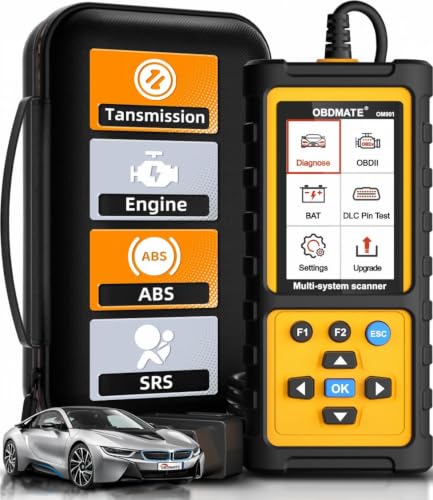
- 【Reset ABS/SRS/Transmission/Engine Lights】 More than an check engine code reader, OBDMATE OM901 obd2 scanner performs comprehensive diagnostics for the 4 most-used systems (ABS/SRS/Engine/Transmission). It quickly clears fault codes, turns off warning lights, read data stream and auto VIN.
- 【3.5" Handheld Scanner with 4 System Diagnose】 3.5" Super large TFT screen equipped displays an intuitive menu and clear readings of various sensors from ABS, SRS, ECM and TCM systems. It arrived with a silicone protective case and hard-shell carrying case, ensuring long-lived durability and drop resistance. The car diagnostic tool is plug-to-play designed, plug it and get diagnosis started without any batteries or updates required.
- 【One-Click I/M Readines&Full OBD2 Functions】 Press F1 to get an intuitive corloured form about whether various emissions-related systems on the vehicle are operating properly. Help you get smog-check ready quickly. OM901 car scanner supports all essential OBD2 functions you need: read & clear codes, view freeze frame, read I/M readiness, retrieve VIN, live data stream (with graphing display), O2 sensor test, onboard monitoring mode, and EVAP leak test.
- 【Battery Voltage Check&DLC Pin Test】 It allows you to monitor battery health by testing current battery voltage. Plus, this obd2 diagnostic tool features DLC 16-PIN test to check current voltage of every pin.
- 【Automotive Scanner Diagnostic Kit】 The package comes with 1 car scanner, 1 USB-type c cable, 1 hard storage bag and 1 user manual(en). Free to update without any hidden fees. 5 languanges available in setting including English, French, Italian, German and Espanish. Valuable and Portable, making it a great tool kit for car owners, DIY enthusiasts, and professional mechanics.

- [Diagnose Like a Pro] BlueDriver Pro is a professional OBD2 scanner and diagnostic tool that helps you scan, understand, and clear vehicle trouble codes with confidence. Turn your phone into a powerful car diagnostic scanner—no guesswork, no unnecessary repairs.
- [Read and Clear More Codes Than Ever] Read and clear more codes than basic car code readers. Access enhanced diagnostics for Check Engine, ABS, SRS, Airbag, TPMS, Transmission.
- [Verified Fixes and Real-Time Data] Get unlimited, technician-verified repair reports matched to your VIN, with definitions, causes, and confirmed fixes. Monitor live vehicle data as you drive, view freeze frames, check smog readiness, and analyze Mode 6 test results.
- [Wireless & Bluetooth Enabled] - Say goodbye to wires. BlueDriver connects with Bluetooth via your phone/tablet to a sensor that plugs into your car's OBDII port. Get all of the capabilities of an expensive code reader & scan tool without any annoying wires.
- [Broad Make & Model Coverage] Strong support for GM, Ford, Stellantis (RAM, Jeep, Chrysler), Toyota, Honda, Nissan, Mazda, Subaru, Hyundai, Mercedes-Benz, BMW, and VW.
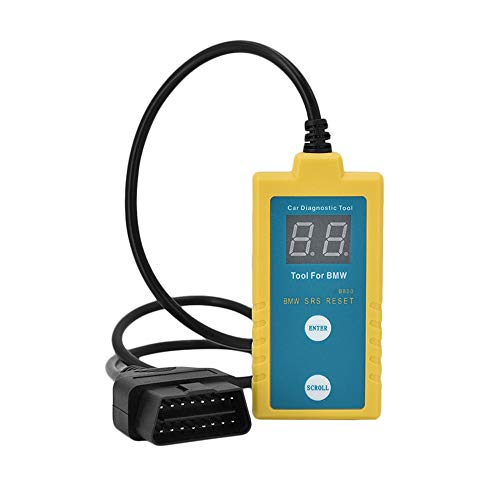
- ✔️【Professional SRS Reset for 1994-2003 BMW】 Designed specifically for classic BMW models (1994-2003). This B800 scanner reads & clears SRS airbag fault codes, turns off the warning light, and saves you a costly dealer visit. Confirmed compatible with: E36, E46 (EXCEPT 2001 330i), E34, E38, E39, Z3, and X5 (E53). NOT compatible with any BMW built before 1994 or after 2003.
- ✔️【Important: Two Different Connection Ports – Read Before Use】 To avoid “not working” issues, please note: For 1994–2000 BMWs (most E36, E34, Z3, early E39), the SRS diagnostic port is a round 20-pin connector under the hood. You MUST use the included 16-pin to 20-pin adapter cable. For 2000–2003 models (late E46, E39, X5), use the standard OBD-II port inside the cabin. Incorrect connection is the #1 reason for “incompatibility” reports.
- ✔️【Read & Clear Fault Codes in Minutes】 Quickly diagnose why your SRS light is on. The scanner accurately reads fault codes from airbag and seatbelt pretensioner systems. With one button press, clear the codes and reset the SRS warning light in seconds. No expensive dealer tools needed.
- ✔️【User-Friendly for DIYers – No Mechanic Required】 Easy operation with an intuitive button layout: ‘Enter’ to confirm, ‘Scroll’ to navigate. The clear LCD screen shows results instantly. Includes a step-by-step manual (revised for clarity) to guide you through the entire reset process.
- ✔️【Reliable Support with 1-Year Warranty】 We stand behind the quality of our B800 scanner. It comes with a 1-Year Hassle-Free Warranty. If you have any questions or need support, please contact us with your Order ID, and our dedicated team will assist you promptly.
- [All System Diagnostics, Professional-Level Scanner] - BLCKTEC 460T is the ultimate OBD2 diagnostic tool for home mechanics and professionals. It supports all 10 OBD2 modes, reads and clears Engine/Transmission/ABS/SRS codes, performs All-System Diagnostics, offers workshop reset tools, and provides real-time live data. It helps you pinpoint issues, assess your car's condition, and prepare for SMOG checks with ease. NOTE: Function availability depends on your vehicle. Before you buy, be sure to use the Compatibility Checker on BLCKTEC website or contact our customer support to verify that the features you need are supported for your vehicle’s specific year, make, and model.
- [12+ Most Popular Reset Functions] - BLCKTEC 460T OBD2 scanner offers 12+ dealer-level service functions, including Oil Maintenance Reset, ABS Bleeding, EPB Reset, SAS(Steering Angle Sensor) Recalibration, DPF(Diesel Particulate Filter) Reset, Throttle Body Relearn, Battery Reset/Initialization, TPMS Relearn, Transmission Reset, Fluid Change Reset, Maintenance Reset and more, enabling you to perform workshop services like a pro. NOTE: Function availability depends on your vehicle. Be sure to use the Compatibility Checker on BLCKTEC website to verify that the features you need are supported for your vehicle.
- [Real-Time OBD2 and OEM Live Data, Freeze Frame Data] - BLCKTEC 460T helps diagnose vehicle issues when warning lights like Check Engine Light or ABS/SRS Light appear. It offers detailed DTC info, ECU Freeze Frame Data, and real-time OBD2 and advanced OEM live data, including Engine, Transmission, ABS, SRS, and more, making it easy to diagnose and resolve vehicle problems. You can view, graph, record, replay, and overlay up to four live data streams in a single graph for better analysis.
- [AutoVIN, AutoReLink, AutoScan, 3X Faster] - Equipped with AutoVIN technology, 460T automatically retrieves the VIN to save you time. Its AutoScan and AutoReLink features scan all of the vehicle's ECUs and detect any fault codes immediately after you plug the scanner into the vehicle's OBD2 port - no button presses required. Additionally, it regathers DTC and I/M readiness information every 30 seconds, simplifying monitor tests. 460T's advanced technology makes it 3X faster than other products.
- [Get RepairSolutions2, the #1 Auto Repair App for Free] - When paired with RepairSolutions2(RS2) App, 460T becomes even more powerful. RS2's Verified Fix Database built by master technicians, provides the parts needed for the repair. Additionally, RS2 gives you access to OEM warranty info, maintenance schedules, TSB, and dealership recall info, making car care easier than ever. RS2 is free with no subscription fees and it stores your car scan reports in the cloud, allowing you to access, share, or print them anytime and anywhere.
This product presentation was made with AAWP plugin.